Gorilla Skins for Monkey Arena
- 3.9
- Rating
- 1.00M
- Installs
- Free
- Price
 Analysis by App-foxy
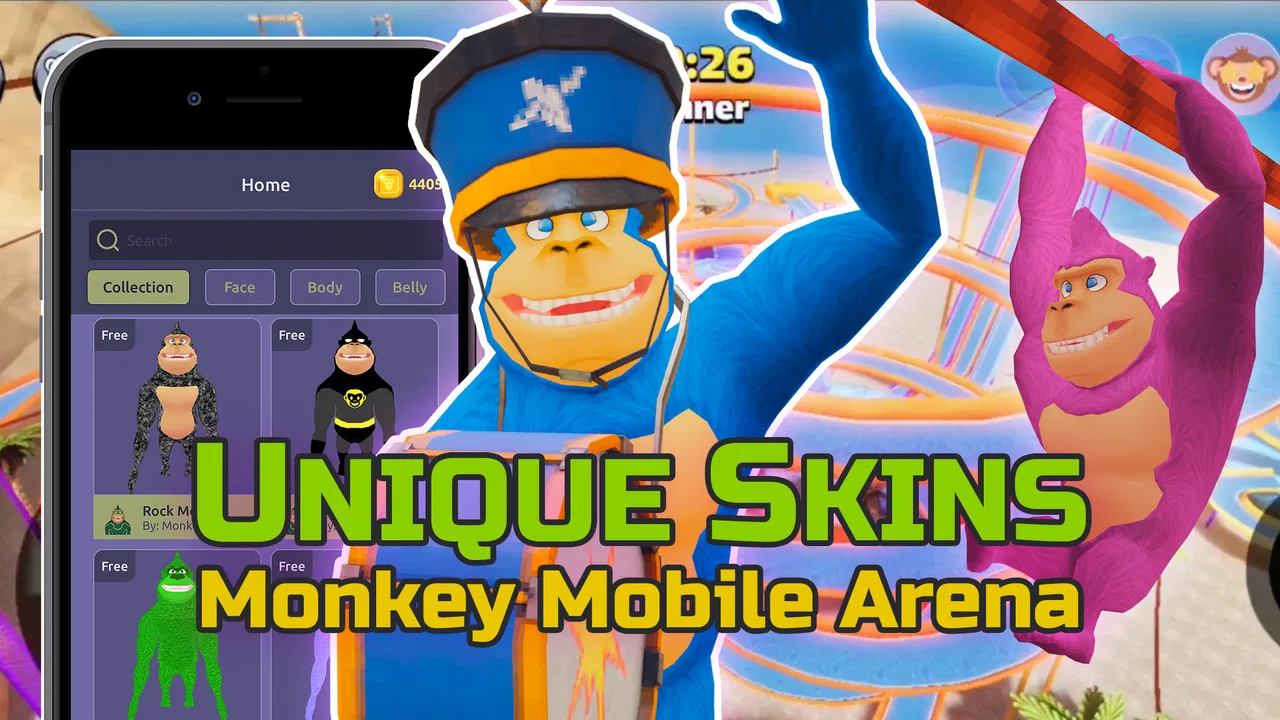
Customizing a character is often more satisfying when the result feels personal rather than randomly selected, and that is the main appeal I found in Gorilla Skins for Monkey Arena. This free personalization app from Dumitru Boico is built around creating skins, tag outfits, and textures for Monkey Mobile Arena. I approached it less like a conventional game and more like a small design workspace: choose an idea, adjust it, check how it looks, and then decide whether it is worth using in the arena.
The app is aimed at people who enjoy changing the visual identity of their gorilla instead of leaving the character with the default appearance. It is listed for Everyone and runs on Android seven or later, so it is accessible to a wide range of devices. At the time of my review, version 4.3.0 was the current release. The basic download is free, although optional in-app items range from $1.99 to $49.99 each, which is important to keep in mind before treating every customization option as part of the no-cost experience.
How the everyday skin-making workflow feels
My preferred way to use Gorilla Skins is to begin with a simple visual goal rather than tapping through every option without a plan. For example, I might want a dark outfit with one bright accent, a texture that is easy to recognize during a busy match, or a tag design that looks playful without becoming difficult to read. Starting with that decision makes the app feel more focused and reduces the temptation to keep changing details that do not improve the final result.
You May Also Like

 Blood Strike: 2.5 Anniversary
Blood Strike’s Loadouts Turn Every Drop Into a Tactical Gamble
A close look at Blood Strike’s custom loadouts: how fast access to signature weapons reshapes its battle royale rhythm, rewards preparation, and narrows the gap between fights.

 Pandora - Music & Podcasts
Pandora’s Music Is Easy to Start, but Harder to Recover
Pandora’s strength is its low-effort path from a seed to a station. Its weak spot is how much confidence it asks you to place in connection, setup, and quiet recovery.

 8 Ball Pool
 Is Built on Rivalries, Rematches, and Routine
A close look at the rivalries, rematches, shared routines, and unanswered safety questions that turn a quick pool match into a persistent mobile community.

 Samsung Music
’s Quiet Strength Is Playing What You Already Own
Its reach comes less from spectacle than from dependable access to a personal library. That simplicity is both the app’s strongest retention engine and its ceiling.

 AccuWeather: Weather Radar
AccuWeather Review: A Quick, Clear Forecast for Everyday Decisions
For everyday plans, the best forecast is the one you can understand quickly. AccuWeather makes rain timing, radar, and local conditions easy to act on, with a few trade-offs.

 Hill Climb Racing
Why Hill Climb Racing Still Turns Crashes Into One More Run
A tiny car, a bumpy hill and one more upgrade: Hill Climb Racing keeps resurfacing because its simple chaos makes every near-miss feel personal.
More From Our News Desk



The basic workflow is straightforward: open the creator, explore the available skin or texture choices, shape the look around a theme, and review the result before using it. That sounds simple, but it matters because customization tools can quickly become cluttered when every choice is made independently. I get better results when I decide first whether the design should stand out through color, pattern, or the tag itself, then keep the other elements quieter.
One useful habit is to make a rough version before spending time on small adjustments. I first create something recognizable with broad changes, then return to refine it. This prevents a common problem with skin editors: investing effort in tiny details before discovering that the overall combination feels wrong. If the silhouette, main color balance, and tag concept work together, the final polish becomes much easier.
The app’s store summary focuses on skins and mods for Monkey Mobile Arena, including tag outfits and textures. In practice, I would treat it as a visual customization companion rather than a replacement for the arena itself. Its value comes from preparing or exploring an appearance, not from adding a new game mode or changing the underlying match experience. That distinction helps set the right expectation before downloading it.
A realistic everyday scenario would be preparing a themed look before playing with friends. I might choose a color combination that makes my character easy to identify, create a matching tag, and keep the texture less busy so the whole design does not look noisy. The process takes more thought than simply selecting the first attractive image, but the result feels more deliberate and is easier to remember later.
Settings and choices worth checking before creating
I recommend checking the app’s available controls before building a detailed design. The most important question is not how many visual choices appear on screen, but which parts of the appearance can be adjusted independently. If the skin, tag outfit, and texture can be considered separately, I would test each one on its own first. That makes it easier to identify which element is responsible when the final look feels unbalanced.
Device comfort also matters. A design screen can feel very different on a compact phone compared with a larger display, especially when controls and previews compete for space. I found it more practical to work slowly and review the complete result instead of making rapid taps. A rushed sequence can lead to selecting a nearby option or overlooking how a texture changes the overall appearance.
There is another setting-related point that experienced users should consider: keep the visual purpose in mind. If the goal is recognition during play, contrast usually matters more than complexity. A highly detailed texture may look interesting in a preview but become less distinctive when the character is moving among other players. For that reason, I tend to use one dominant idea and one supporting detail instead of stacking several strong patterns.
Because the app includes optional purchases, I would also pay attention to the point at which a choice moves beyond the free experience. The free starting point makes it easy to experiment without committing immediately, but the listed purchase range means a large collection of optional items can become expensive if selected impulsively. I would decide on the design first and only consider a paid item when it clearly improves the result I am trying to achieve.
The average rating is 3.9 from around 1.4 thousand ratings, while the listing shows 23 written reviews. I read that combination as a sign to keep expectations practical: the app has attracted substantial interest, but it is not something I would recommend blindly to every player. The experience depends heavily on whether you actually enjoy customizing Monkey Arena visuals. Someone looking for a deeper design editor may find the workflow limited, while a casual player wanting a quick appearance change may find it sufficient.
Faster patterns that reduce repetitive tweaking
The fastest approach I found is to work in passes. In the first pass, I choose the general mood: bright, dark, playful, clean, or attention-grabbing. In the second, I decide whether the texture supports that mood. In the third, I check the tag outfit and remove anything that competes with the main visual idea. This is quicker than repeatedly changing all three areas at once because each pass answers a different question.
I also recommend keeping a small mental library of combinations that already work. If a particular texture looks good with a restrained tag, I remember that relationship instead of rebuilding it from scratch every time. The benefit is not a hidden shortcut; it is a repeatable habit. Gorilla Skins becomes more efficient when I treat successful combinations as starting points rather than endlessly searching for a perfect new arrangement.
Another practical pattern is to create for visibility first and style second. When I want a design that will be easy to recognize in the arena, I avoid using similar tones across every element. A clear difference between the main skin and the tag makes the character easier to pick out. This is especially useful when playing with friends, where quick recognition can matter more than having the most elaborate texture.
For a more expressive design, I reverse the order. I begin with the texture or tag concept, then choose a skin that supports it. This works well when the tag is the centerpiece and the rest of the outfit should act as a frame. The trade-off is that a concept-led design may be less immediately visible during play, so I would use it when personal expression matters more than instant identification.
I would not spend too long trying to make a single creation perfect. The app is more enjoyable when treated as an iterative tool: make one version, inspect it, adjust the strongest weakness, and move on. If the design still feels uncertain after several revisions, starting again with a simpler idea is often more productive than adding more decoration.
One non-obvious advantage of this approach is that it helps separate taste from usability. A skin can be attractive in a still preview but awkward as a practical identity if every part has equal visual weight. By testing simple and complex versions side by side, I can see whether extra detail genuinely improves the look or merely makes it harder to read.
Where the app reaches its limits
Gorilla Skins is not the right choice for someone who expects a full professional graphics editor. I would not install it for layered illustration, advanced image manipulation, or broad character design outside Monkey Mobile Arena. Its purpose is narrower: create and explore visual alterations connected to the gorilla-themed arena experience. That focus is useful, but it naturally limits how far a serious designer can take a project.
I would also be cautious about assuming that every attractive customization is free. The app itself is free to download, but optional items are priced individually, from $1.99 to $49.99. That range makes it sensible to establish a spending limit before browsing. If you only want a quick visual change, the free portion may be enough. If you want to collect many premium-looking options, the total cost deserves more attention than any single item.
The app may also disappoint users who want a highly automated workflow. I found the best results came from making deliberate choices and reviewing them, not from expecting the creator to produce a finished identity with no input. People who enjoy tweaking will probably see that as part of the fun. People who want one tap to generate a polished look may find the process slower than expected.
Another limitation is that customization quality depends on context. A texture that looks excellent in the editor may not have the same impact during active play, where movement and other characters draw attention away from fine details. I would therefore judge a design by two standards: does it look good in the creator, and does its main idea remain visible when the screen becomes busy? If it only passes the first test, I would simplify it.
Compared with the usual alternatives in the personalization category, this app is more focused than a general wallpaper, icon, or theme tool. A broad personalization app is better if you want to change the whole phone interface. A general drawing application is better if you need complete control over artwork. Gorilla Skins makes more sense when the specific goal is giving a Monkey Arena character a customized visual identity without leaving that narrow use case.
That specialization is both its strength and its weakness. I appreciate not having to navigate unrelated phone themes or advanced drawing controls when I only want to work on a gorilla skin. At the same time, the limited scope means I would not keep it installed for general Android personalization. Its usefulness depends almost entirely on whether Monkey Mobile Arena is part of my regular gaming routine.
Who will get the most from it
I think the best audience is players who enjoy small creative decisions around their matches. You do not need professional design skills, and you do not have to create an elaborate concept every time. Even a simple color direction and a matching tag can make the character feel more personal. The app is also a reasonable fit for younger users because its content rating is Everyone, although purchase decisions should still be handled carefully.
It is particularly useful for players who regularly change their mood or theme. Someone might want a bold look for a group session, a quieter texture for everyday play, or a humorous tag for a particular occasion. The repeatable workflow makes those changes less intimidating because each new design can begin with a familiar structure instead of a blank slate.
I would skip it if I rarely play Monkey Mobile Arena or if my interest in personalization is limited to phone wallpapers and icons. In that situation, a broader customization app would offer more value. I would also skip it if I need export-oriented design work, professional editing controls, or a guaranteed way to transform unrelated games. This is a focused tool, not a universal customization platform.
The app has passed one million installs, which suggests that its narrow idea has reached a large audience. That does not automatically make it the best option for every player, but it does make the concept easy to understand: this is a dedicated place for experimenting with gorilla-themed skins, tags, and textures. I would judge it by how often I use that specific function rather than by the install figure alone.
My verdict after building repeatable habits
After using it as a design companion rather than expecting a complete game expansion, I found Gorilla Skins most rewarding when I followed a consistent routine: choose one visual goal, build a simple base, check the contrast, refine the tag, and review the result in context. That method keeps the process quick and reduces the common temptation to add detail simply because another option is available.
The strongest reason to try it is focused creative control for Monkey Mobile Arena without the distraction of a general phone-theme catalog. I like that the app gives customization its own space, and I can see why players who care about their gorilla’s appearance would return to it. The free entry point also makes experimentation approachable, provided I remember that optional items can carry separate costs.
My reservations are equally clear. It is not a substitute for a full graphics editor, it may feel too narrow for people who do not play the associated arena game, and detailed designs do not always remain effective during fast gameplay. The best results come from restraint and repeatable habits, not from piling on every texture and outfit choice.
Overall, I would recommend it to a friend who enjoys Monkey Arena and wants a more personal look for the character. I would describe it as a focused personalization app with a practical creative loop rather than a must-have utility for every Android user. If that specific use case matches you, the current version 4.3.0 is worth exploring; if not, a broader personalization tool will probably serve you better.
FAQs for Gorilla Skins for Monkey Arena
01What is Gorilla Skins for Monkey Arena?
Gorilla Skins for Monkey Arena is a customization-focused app or resource designed for players who want to change the appearance of their in-game gorilla characters. It may include themed skins, visual variations, and related outfit ideas. Before downloading, users should verify the exact features, supported game version, and whether the content is an official addition or a third-party companion.
02Is Gorilla Skins for Monkey Arena an official game or an independent app?
Gorilla Skins for Monkey Arena should not automatically be considered the official Monkey Arena game or an official developer tool. Its branding and available content may be created by an independent publisher. Check the developer name, store description, update history, permissions, and privacy information before installing. This is especially important if the app asks for login details or access to other accounts.
03Does the app provide real skins directly inside Monkey Arena?
The answer depends on how the current version is designed. Some skin apps only display previews, concepts, or downloadable image packs, while others may offer instructions or content intended for a compatible game version. Users should read the listing carefully and avoid expecting guaranteed in-game unlocks. Never provide passwords or use unofficial modifications if they could violate the game’s rules.
04Is Gorilla Skins for Monkey Arena safe to download?
Safety depends on the download source, publisher, permissions, and the app’s current privacy practices. Downloading through the official Google Play Store or Apple App Store is generally safer than using unknown websites, although users should still review ratings and recent comments. Be cautious if the app requests unnecessary permissions, redirects to suspicious pages, contains excessive advertising, or asks for sensitive personal information.
05What should I check before installing Gorilla Skins for Monkey Arena?
Before installing, check whether your Android or iOS device meets the stated requirements, how much storage the app needs, and when it was last updated. Review screenshots to confirm that the content matches your expectations, and read recent user feedback for reports of crashes or misleading features. Also confirm whether the app is free, includes in-app purchases, requires an internet connection, or collects usage data.
Pros
- Large collection of gorilla-themed skins to personalize gameplay.
- Simple browsing makes it easy to find and preview designs.
- Useful inspiration for players creating their own character styles.
- Lightweight interface loads quickly on most modern devices.
- Regularly refreshed content can keep the selection feeling current.
Cons
- Some skins may require external downloads or additional setup.
- Preview quality can vary between different skin designs.
- The app may include frequent advertisements during browsing.
- Not every skin is guaranteed to work with every game version.
- Limited value for players who prefer default or non-gorilla characters.

Gorilla Skins for Monkey Arena
Gallery